

To change a user's permissions, first log in to your Otohost account.
Accessing the User Management Page
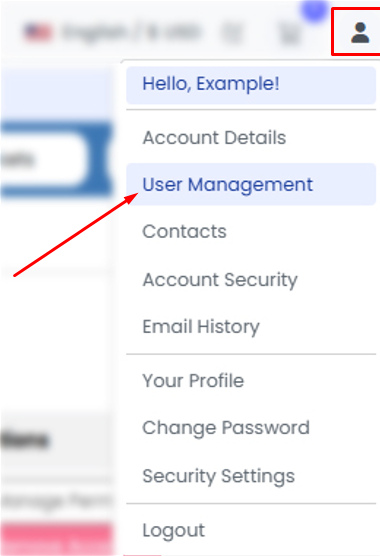
- Click on the profile icon (👤) located in the upper-right corner of your Client Area.
- From the dropdown menu, navigate to the "User Management" section.
Editing User Permissions
- Click the "Manage Permissions" button next to the user whose permissions you want to modify.
- On the page that opens, assign or remove permissions by checking or unchecking the relevant permission boxes.
Saving Changes
- After making the necessary changes, click the "Save Changes" button.
Completed
- The user's permissions will be updated successfully. The changes take effect immediately, and the user will be able to access and use the account according to the permissions you have assigned.

